Battery at Breaking Point? How UK Laptop Owners Can Spend Smartly in 2026
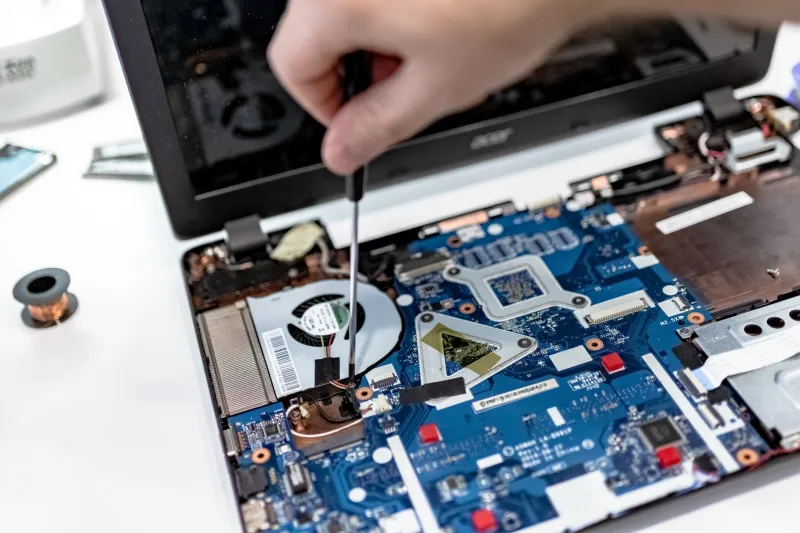
Your laptop drops from 40% to dead in the time it takes to make a brew. You plug it in, wiggle the cable, and wonder whether this is a cheap fix or the beginning of the end. In 2026, that is a genuinely tricky question. A new battery can cost anywhere from about £35 to £150 fitted, and on a laptop that is already wheezing, that money can vanish into a machine that still needs replacing six months later.
At Just4Laptops, we see plenty of owners jump straight to a replacement battery when the real fault is a tired charger, a worn port or software that is reporting nonsense. So before you spend, do a bit of detective work.
First, prove it is actually the battery
A battery that will not hold charge is not always the guilty party. Check the obvious: does the laptop run reliably with the charger connected? Does the charging light flicker when you move the plug? Try a different charger if you have one, and look at the port for fluff, bent pins or a loose connection.
On Windows, run a battery report and look at design capacity versus full charge capacity. On a Mac, open System Settings and check battery health. Linux users can usually get a sensible reading from upower or the desktop battery panel. If the health is above roughly 80% and the machine still dies early, the battery may simply need calibration, or the problem may be elsewhere.
Be honest about symptoms too. A battery that swells, makes the trackpad lift or causes the chassis to bulge is not a calibration issue. Stop using it, do not press on it, and get it assessed safely.
The £60 to £120 spending window
This is the awkward middle ground. A third-party compatible battery often lands around £35 to £80 before fitting. A genuine manufacturer battery can be £70 to £150 or more, depending on the model. Fitting at a repair shop might add £20 to £60, and glued-in ultrabook batteries can push that higher because they take longer and carry more risk.
Genuine batteries are the safer bet for fit, warranty and resale confidence, but they are not automatically good value on an older machine. Third-party batteries vary wildly. A reputable brand with a clear UK warranty, proper safety markings and decent reviews can be fine. A no-name cell from a marketplace listing with suspiciously cheerful photos is a gamble you do not need.
Check the warranty length, the returns address and whether the seller is UK-based. If the listing avoids mentioning cell type, capacity or safety certification, move on.
When DIY is a bargain, and when it bites
Older laptops with removable battery packs are a gift. Slide the latch, swap the pack, done. Some slightly newer models use a few screws and a simple connector. If you are comfortable with small repairs, that can be a sensible £40 fix.
Glued-in batteries are a different sport. You may need heat, pry tools, adhesive remover and a steady hand. The risks include cracking the screen, damaging the trackpad, tearing a ribbon cable or puncturing the battery itself. Lithium-ion batteries can catch fire if damaged, so a swollen or glued-in pack is not the moment to learn by YouTube.
If the laptop cost you £900 and is otherwise excellent, paying a professional £40 to fit a battery is money well spent. If the laptop is a £120 eBay special with a cracked hinge, the maths changes quickly.
The value test: will a new battery actually save the machine?
Ask three questions. First, is the rest of the laptop healthy? A worn hinge, failing fan, dim screen or slow hard drive can turn a battery repair into the first instalment of a longer saga. Second, does the machine still do what you need? If it struggles with your work apps, a new battery only helps it struggle for longer. Third, what is the total cost compared with a replacement?
A decent refurbished business laptop can often be found for £250 to £450 in 2026. If a battery repair is £100 and the machine is worth £150, you are throwing good money after bad. If the laptop is a solid recent model worth £500 or more, a £100 battery is a reasonable stay of execution.
Recycling and safe disposal in the UK
Do not put laptop batteries in the bin. They are classed as waste electrical and electronic equipment and can cause fires in refuse lorries and recycling plants. Use a local council household waste recycling centre that accepts batteries, or a retailer take-back scheme. Currys and many other UK electrical retailers accept small electrical items for recycling, and Recycle Now can point you towards local options.
If the battery is swollen, do not puncture it, bend it or tape it tightly. Isolate it if you can, keep it away from anything flammable, and take it to a proper recycling point or repair shop. Before recycling the whole laptop, back up your files and wipe the drive. A battery problem is no reason to hand over your data.
A simple decision guide
- Battery health above 80% and the laptop works on mains: investigate the charger, port and software first.
- Battery health below 60%, laptop otherwise healthy and worth £400 or more: replacement is usually worth it.
- Battery health poor, laptop old, slow and showing other faults: retire it or sell it for parts.
- Swollen battery: stop using it and get professional advice.
- Glued-in battery on a costly machine: pay for fitting rather than risk a DIY disaster.
The £60 battery question is rarely just about £60. It is about whether the rest of the laptop deserves another chapter. Spend on the machine that will keep earning its keep, and recycle the one that has already told you it is finished.