Dock, Hub or Dongle? A Tidy Under-£150 Laptop Desk That Won’t Let You Down
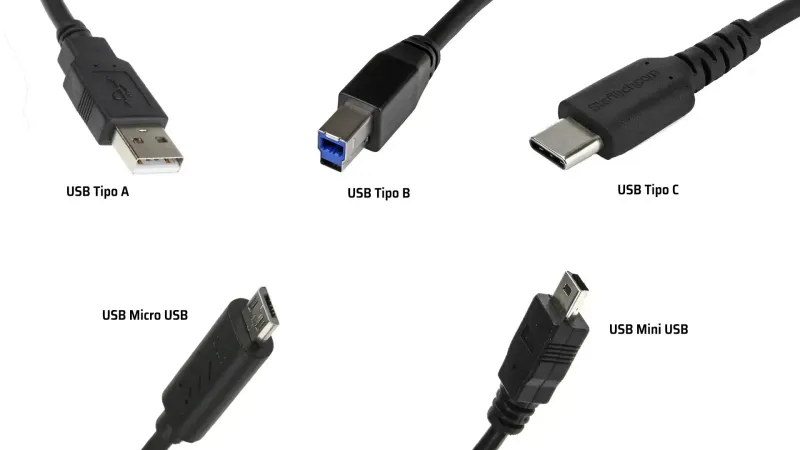
Photo: USB-C dock laptop stand tidy home office desk UK, via www.hwlibre.com
A tidy home desk does not need a £300 Thunderbolt dock and a matching monitor arm. For most UK home workers, £150 is enough to sort out power, video, storage and comfort — if you spend it in the right order. Here is how to choose between a USB-C dock, a hub and a simple dongle without buying something that overheats, drops your monitor or refuses to charge your laptop.
Count your ports before you shop
Before you look at a single accessory, write down what you actually plug in. One monitor? Two? Wired Ethernet for a steadier Teams call? An SD card reader for a camera? A USB-A receiver for an old mouse? A headphone jack for calls?
If your laptop already has HDMI, two USB-A ports and a headphone jack, you may only need a cheap dongle or nothing at all. If it has two USB-C ports and nothing else, a hub or dock starts to make sense. The point is to buy for the desk you have now, not the imaginary desk you might build after a lottery win.
USB-C dock, hub or dongle?
A dock is the desktop box. It usually has its own power supply, a handful of USB-A ports, Ethernet, audio and one or two video outputs. You plug in one cable and everything connects. Business docks from Dell, HP and Lenovo are often available used for £40 to £80, which is tempting — but check that your laptop supports the dock’s USB-C or Thunderbolt standard, and that the seller includes the correct power brick. Some docks are fussy about firmware and proprietary chargers.
A hub is the pocket-sized option. It runs off your laptop’s USB-C port and splits it into HDMI, USB-A, Ethernet and sometimes an SD reader. Expect to pay £25 to £60 for a decent one. Hubs are great for one monitor and a few peripherals, but they can get warm, and the power delivery passthrough is often lower than the headline figure suggests.
A dongle does one job: HDMI, Ethernet, or USB-A. At £10 to £20 it is the cheapest way to add a missing port, but you end up with a pocketful of adapters and a desk that looks like a nest of cables. Fine for occasional use, less fine for a permanent setup.
Power delivery: the spec that catches people out
This is where cheap accessories let you down. Your laptop may need a 45W, 65W or 90W charger. A hub might claim 100W passthrough, but that usually includes the power it takes for its own ports. If your laptop charger is 65W and the hub passes through only 50W to the laptop, the battery may drain while you work.
Check the small print. Some docks need a 90W power supply to deliver 65W to the laptop. Some laptops with barrel-jack chargers will not charge over USB-C at all, even if the port looks the same. And a phone charger is not a laptop charger, no matter how many watts the label claims.
Monitors and cables
A cheap hub may support 4K at 30Hz rather than 60Hz, which makes the mouse pointer feel sticky. If you want a sharp 4K desktop at 60Hz, check that the hub supports DisplayPort Alt Mode and HDMI 2.0 or DisplayPort 1.2. For dual monitors, confirm the hub can extend rather than mirror the display. Some cheap units only duplicate the laptop screen.
Use a decent cable. The free HDMI cable from a drawer may be fine, but a certified HDMI 2.0 or USB-C cable removes one variable. If you are using a used business dock, check which outputs work with your laptop’s generation — Thunderbolt and USB-C compatibility is not always as universal as the marketing suggests.
Comfort first: stand, keyboard and mouse
If your neck aches after a morning of spreadsheets, a dock will not fix it. Raising the laptop screen to eye level and using an external keyboard and mouse will. A basic laptop stand costs £15 to £30. A wired or 2.4GHz keyboard and mouse combo can be £30 to £50. That is often a better use of £60 than a fancy hub you do not need.
At Just4Laptops, we would spend the money in this order: stand, keyboard and mouse, then the hub or dock. Comfort and reliability beat having the most ports.
Avoiding marketplace tat
UK marketplaces are full of USB-C hubs with impressive claims and no brand name. Be careful. Look for a seller with a UK returns address, a proper UK plug or UKCA/CE marking, and reviews that mention long-term use rather than just delivery speed. A no-name 100W charger that runs hot is not a bargain.
Used docks can be excellent value, but ask about the power supply, any missing cables and whether the firmware has been updated. If the listing says no returns, think twice. A dock that does not work with your laptop is just a paperweight with ports.
A sensible £150 build
A practical setup might look like this: a USB-C hub with 100W PD input, HDMI 4K60, Ethernet and two USB-A ports for £45; a laptop stand for £20; a wired keyboard and mouse for £30; and an HDMI cable for £8. That is £103, leaving room for a spare charger or a better stand. If you prefer a used business dock, budget £50 for the dock, £20 for a stand and £30 for keyboard and mouse — then check the dock includes its power supply.
The one-cable reality check
A good dock should mean one cable to the laptop, but it still needs power and a monitor cable. Test everything within the return window. Label the cables. Do not buy a dock for ports you might use one day. Buy for the monitor, keyboard and network you use today, and keep the rest of the £150 for a decent chair or a second monitor when the budget allows.